RAG System Architecture
Overview of the Retrieval-Augmented Generation (RAG) system for chatting with datasets and documents.
Integrated Data Adeloop
Ingest, process, and analyze data from any source. Adeloop unifies your stack into one cohesive operational layer.

Control Plane
Adeloop Core
The RAG (Retrieval-Augmented Generation) system enables users to interact naturally with their data. By embedding datasets and documents into a vector database, the system allows for semantic search and context-aware responses from LLMs.
Architecture Overview
The system utilizes a hybrid architecture where the frontend handles user interaction and state management, while a dedicated Python backend orchestrates the heavy lifting of document parsing, embedding, and vector retrieval.
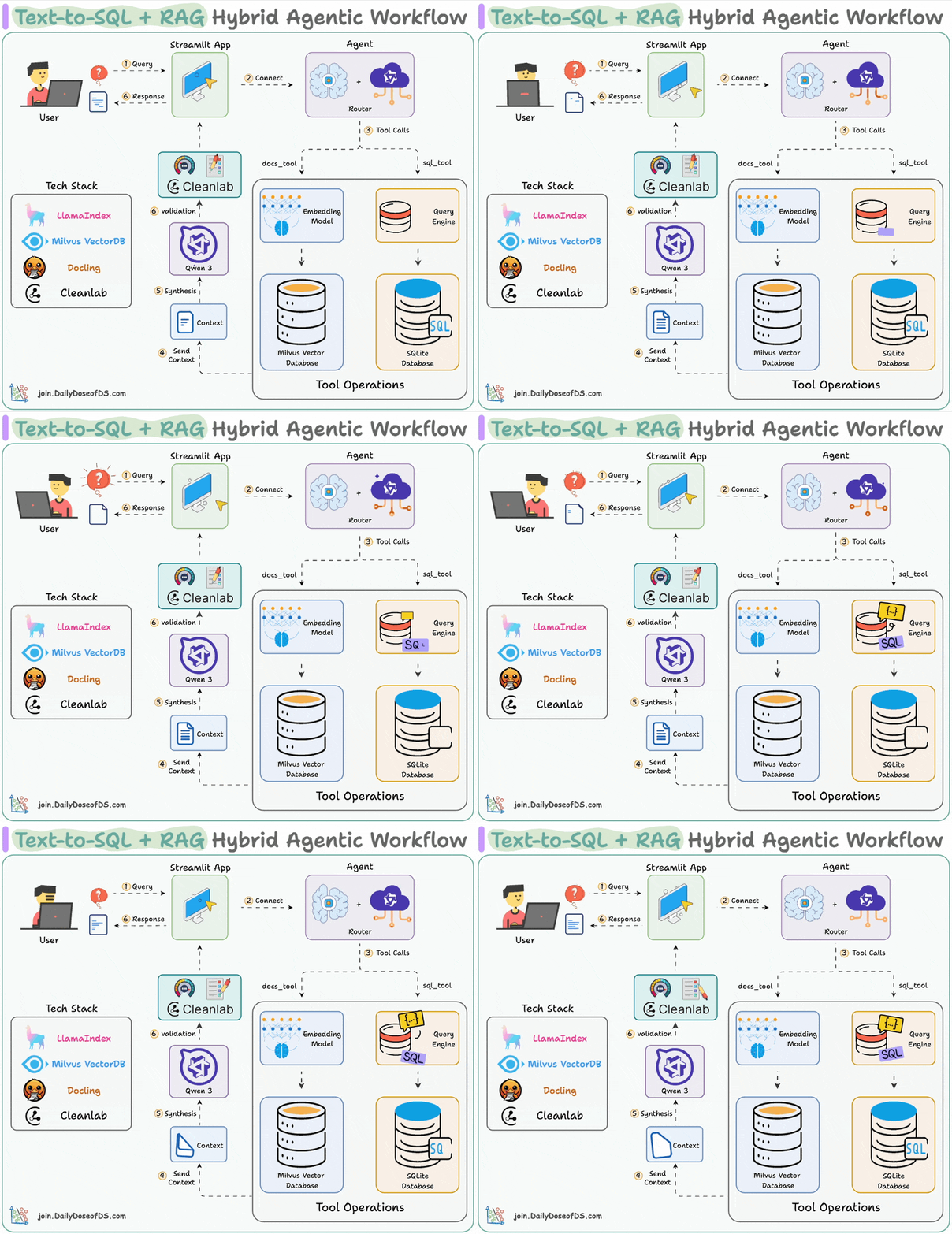
Visualizing the Hybrid RAG Flow
Key Components
- RAG Interface: The main UI component that manages the document selection sidebar, chat interface, and settings. It monitors the connection status to the backend and handles the state of embedded documents.
- API Proxy Layer: A set of Next.js API routes that act as a secure gateway. They validate user sessions, fetch dataset metadata from the primary database, and forward authenticated requests to the Python service.
- Python RAG Service: A dedicated service responsible for:
- Document Parsing: converting various file formats (PDF, CSV, etc.) into processable text chunks.
- Embedding: Generating vector representations of text using high-dimensional embedding models.
- Orchestration: Managing the interaction between the vector database and the LLM.
Data Flow
1. Embedding Process
When a user toggles the "Embed" switch for a dataset, the following process is triggered:
- Fetch: The Next.js proxy retrieves the full dataset content from the application database.
- Transmit: The data is securely sent to the Python backend.
- Process: The backend parses the content (using specialized parsers for different file types) and splits it into semantic chunks.
- Vectorize: Each chunk is converted into a vector embedding.
- Index: Vectors are upserted into the Pinecone index with metadata (source ID, text content).
- Flag: The dataset is marked as
embeddedin the primary database to reflect its status in the UI.
2. Query Execution
When a user asks a question in the chat interface:
- Vectorize Query: The user's question is converted into a vector using the same embedding model.
- Semantic Search: The vector database is queried to find the most relevant text chunks (nearest neighbors) based on cosine similarity.
- Context Assembly: retrieved chunks are assembled into a context window.
- Generation: The LLM generates an answer based strictly on the provided context, ensuring grounded responses.
Usage Examples
Embedding a Dataset
The system operates via a RESTful API. Below is a conceptual example of the payload sent to the backend to initiate embedding:
// POST /api/rag/embed
{
  "dataset_id": "ds_12345",
  "user_id": "user_abc789",
  "name": "sales_report_q1.csv",
  "data": [
    { "product": "Widget A", "sales": 1200 },
    { "product": "Widget B", "sales": 850 }
  ],
  "file_type": "csv"
}
Querying with Context
When querying, the system filters context by the specific dataset IDs relevant to the user's session:
// POST /api/rag/query
{
  "query": "What were the sales for Widget A?",
  "dataset_ids": ["ds_12345"], // Context filter
  "top_k": 5 // Number of chunks to retrieve
}
Features
Smart Context Management
- Pinned Datasets: Users can "pin" specific datasets to keep them permanently in the context window.
- Hybrid Search: Combines keyword search with semantic search for better accuracy (where supported).
- Source Citations: Responses include references to the specific documents and chunks used to generate the answer.
Security & Isolation
- Namespace Isolation: vectors are stored in isolated namespaces (e.g., per user or tenant) to ensure data privacy.
- ** ephemeral Processing**: Raw document data is processed in memory on the backend and not permanently stored there; only the vectors and necessary metadata persist in the vector DB.
Data Strategy & Analysis Patterns
The platform employs a specialized strategy for different data types to ensure optimal analysis accuracy.
1. Unstructured Data (RAG)
Best for: PDFs, Word documents, Images (OCR), Policy files, Knowledge bases.
- Why: These documents contain rich semantic context but lack rigid structure.
- Mechanism: We use RAG (embedding + vector search) to retrieve relevant "chunks" of text based on the user's query.
- Use Case: Finding specific rules, compliance policies, or historical context (e.g., "What is the reimbursement limit for travel?").
2. Structured Data (SQL & Python)
Best for: CSVs, Excel spreadsheets, Databases.
- Why: Vector embeddings often lose the precise row-column relationships needed for quantitative analysis (aggregations, precise filtering, math).
- Mechanism: We use DuckDB (SQL) or Pandas (Python) for deterministic execution.
- Use Case: Calculating totals, trends, or specific metrics (e.g., "What was the total revenue in Q3?").
3. The "AI Synthesis" Layer
The AI acts as the bridge between these two worlds. It does not "guess" the data values; instead, it:
- Executes Code: Writes and runs SQL/Python to get hard facts from structured data.
- Retrieves Context: Uses RAG to find rules/context from unstructured documents.
- Synthesizes: Combines the facts with the rules to provide a comprehensive answer.
Example Workflow:
- User: "Is the Q1 expense report within policy?"
- Step A (Structured): AI queries the CSV using Python/SQL -> Result: "Q1 Total Expense: $12,000".
- Step B (Unstructured): AI searches the Company Policy PDF using RAG -> Result: "Quarterly expense limit is $10,000".
- Step C (Synthesis): AI answers: "No, the Q1 expense ($12,000) exceeds the policy limit of $10,000."
Supported Data Types
The system is designed to handle multiple input formats:
- Structured Data: CSVs, Excel files (converted to textual representations).
- Unstructured Documents: PDFs, Word documents, Markdown files.
- images: (Future/Beta) Vision-capable embedding for image analysis.